Home/Projects
Projects

Every engagement, under control.

Project management software for professional services firms — plan client work, track time on tasks, and give partners visibility without another status call.

Built for CA, IT services, law, and agency engagements where WhatsApp, sheets, and memory still carry too much of the delivery system.
Built for client workOne account for the whole firm
Workplate Projects
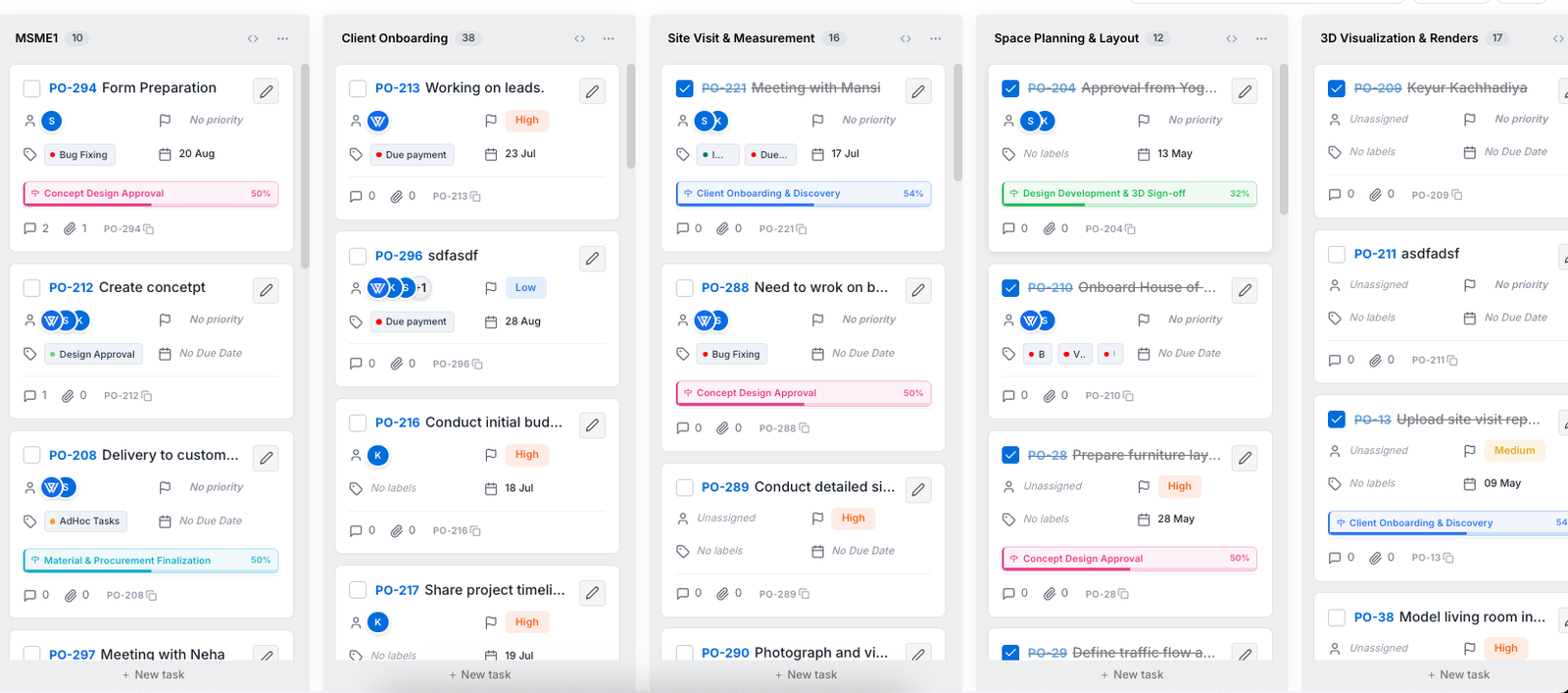
Workplate Projects engagement board with owners, due dates, and workflow columns

Why firms move delivery into Projects

Fewer status calls

8–10 / month

Daily Work Reports and engagement boards replace narrated updates.

Hours visible earlier

~10 hrs / week

Timers on tasks so billable effort isn't reconstructed on Friday night.

Clearer ownership

1 owner

Every next action has a name, a due date, and the files beside it.

Earlier leakage signal

Mid-week

See unlogged or drifting work before month-end write-offs.

The delivery problems Projects is built to absorb.

Mature product pages lead with jobs-to-be-done, not feature lists. These are the firm pains this module targets.

01

Work living in five channels

Client asks arrive on WhatsApp. Status lives in someone’s head. Files sit in email. Projects gives the engagement a spine.

02

Hours that never reach billing

Time tracked late — or not at all — becomes leakage. Task-level timers make capture part of doing the work.

03

Partners flying blind

Without a shared board and DWRs, leadership runs on interruptions. Exception-based review beats another status meeting.

Capabilities

What Projects does for your firm.

Planning, delivery, collaboration, and time together — so leaders can see how work is moving without assembling a report by hand.

01

Project management

  • Boards, lists, and timelines for client engagements
  • Sprints with milestones for delivery cycles
  • Subtasks, dependencies, and recurring work
  • Custom statuses that match how your firm actually runs
02

Collaboration

  • Comments, @mentions, and threaded replies on the work
  • File attachments beside the task — not lost in chat
  • Activity feed for every meaningful change
  • Real-time updates across the delivery team
03

Time tracking

  • One-click timer on every task
  • Manual entry when the timer wasn’t started
  • Billable vs non-billable flagging
  • Time KPIs by person and engagement
04

Insights & AI

  • AI-generated Daily Work Reports
  • Velocity and burndown for cycle-based teams
  • Project health dashboards for partners
  • Roadmap Deeper cross-module AI context as modules connect

How a services week runs in Projects.

Peers show operating rhythms, not only menus. Use this as the “day in the life” depth layer.

Kickoff

Start clean

Capture outcome, scope edges, owners, and first milestones so the engagement doesn’t begin as a vague chat thread.

Kickoff guide →
Daily

Work where the task lives

Move cards, comment in context, start the timer, attach the file. Less reconstructing “what happened” at 7pm.

Partner review

Read exceptions

Daily Work Reports and health views surface blockers and drift — without a standing status tax.

What is a DWR →
Week close

Time you can trust

Reviewed hours by engagement, ready for billing conversations. Full hours→invoice automation stays honest as roadmap where needed.

Billing leakage guide →

Capacity and profitability hygiene — framed honestly.

Productive and Accelo lead with resourcing and margin. Workplate Projects already supports the operating habits; deeper forecasting can be labeled as expanding.

Capacity

Before you say yes to new work

See engagement load, owners, and deadlines so partners aren’t guessing who can take the next client.

  • Portfolio of active engagements
  • Ownership and due-date clarity
  • Roadmap Capacity heatmap for engagement load
Capacity guide →
Profitability hygiene

Before month-end surprises

Time on the work, scope changes visible, reviewed effort ready for Invoice on the same account.

  • Billable vs non-billable discipline
  • Mid-week leakage signals
  • Roadmap Hours flowing straight into invoices
Explore Invoice →

Built for how services roles actually work.

Partners / founders

Exception-based visibility across engagements — progress, blockers, and effort — without sitting in every update meeting.

Managers / delivery leads

Boards, dependencies, and time by person so staffing and handoffs don’t rely on memory.

Individual contributors

One place for today’s tasks, comments, files, and timers — less tool-hopping between chat and sheets.

Projects for your kind of firm.

CA practices

Recurring compliance plus advisory engagements — owners, filing-related tasks, and follow-ups on one spine.

CA workflows →

IT services

Sprints, client deliveries, and time that protects margins when hours are under pressure.

IT services workflows →

Law firms

Matters with clearer task ownership and recorded effort for realization hygiene.

Law workflows →

Agencies & consultancies

Retainers and scoped projects with briefs, tasks, and time tied to the engagement.

Agency workflows →

See Projects in the work.

Real product views from an engagement: board, milestones, time approvals, and tracking KPIs. Click a shot to enlarge.

MilestonesOwners, progress, and risk in one list
Time approvalsReview and approve hours on the engagement
Time tracking KPIsHours by contributor across the engagement
One plate, all your work

Projects stands alone. It also connects.

Start with Projects for delivery and time. Add CRM, eSign, Invoice, or AI Chat on the same account when the next workflow hurts.

Fits the stack around delivery.

Task timersCapture effort where work happens
MCP / AI toolsAsk project status from Claude or ChatGPT when enabled
Same-account InvoiceBilling modules on one Workplate login
Calendar / mailNext — sync meetings and follow-ups
Accounting exportNext — export for books and GST filings
Projects FAQ

Questions about running work in Projects.

The practical details teams usually want before moving engagements into Workplate.

Yes. You can organize client engagements, internal initiatives, and recurring operational work with custom statuses and workflows that match how each type of project runs.
Team members can start a timer from a task or add time manually. Entries can be reviewed and approved, marked billable or non-billable, and reported by user or project.
Yes. Work can be viewed as boards, lists, or timelines, with sprints and milestones available for teams that plan delivery in cycles.
Yes. Tasks can include subtasks and dependencies, and recurring tasks can be used for repeatable client or internal workflows.
Leaders can use auto-generated daily work reports, project-health dashboards, velocity and burndown charts, and time KPIs to understand progress without assembling updates manually.
Projects gives professional services teams engagement planning, collaboration, time, and partner visibility on day one. Deeper resource forecasting and hours-to-invoice automation continue to expand on the roadmap — we’ll show you what’s live for your workflow in a demo.
Yes. Every Workplate module stands on its own. Many firms start with Projects for delivery and time, then add CRM, eSign, or Invoice on the same account when the next workflow hurts.

Related guides from the Workplate Journal.

What is a Daily Work Report

Why services firms use DWRs and how to keep them useful.

Read →

Clearer client project handoffs

Scope, ownership, context, and review in one checklist.

Read →

Partner capacity before new work

A practical review before you say yes to the next engagement.

Read →

See how your engagements could run in Workplate.

A focused 30-minute walkthrough, shaped around how your firm already works — Projects first, other modules only if you want them.